If you’re thinking OpenClaw is “one more chatbot,” you’re already behind. OpenClaw is closer to an always-on assistant you run on your own machine — and you talk to it inside apps you already use (WhatsApp, Telegram, Slack, Discord, Teams, etc.).
If you’re interested in where this is going next (AI agents using websites reliably), read this: Google WebMCP & the agentic web.
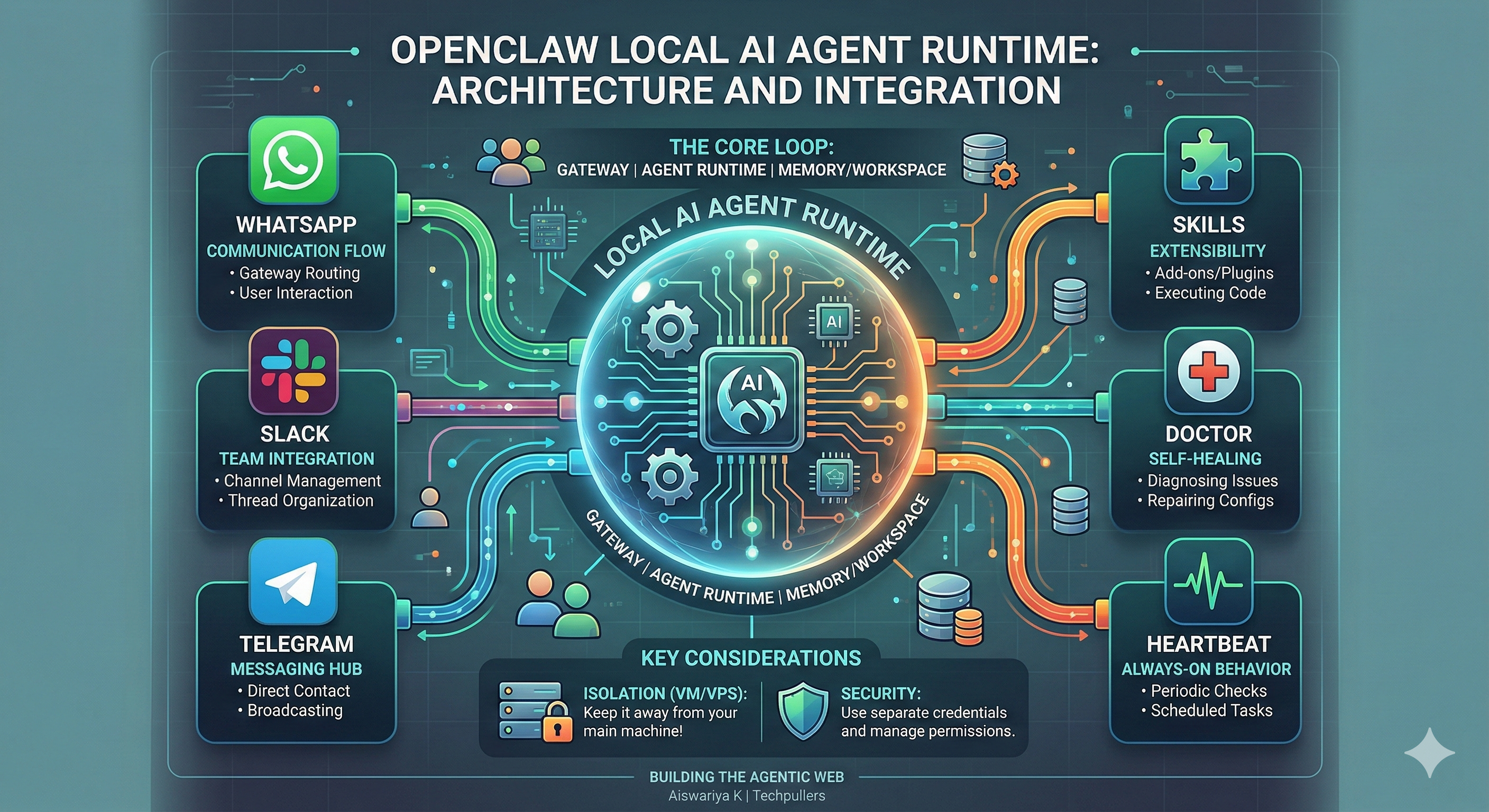
OpenClaw is getting attention because it’s not just “answering” — it’s built around the idea of an agent runtime that can stay online, connect to real channels, use tools, and keep sessions alive.
If you want the quickest way to understand the shift: OpenClaw feels like agent infrastructure, not an “AI app”. (That’s also why security + permissions become a real discussion, not a footnote.)
Not like the “acquisition” headlines people imagine. Public reporting indicates the creator is joining OpenAI, while OpenClaw remains open-source under a foundation setup (with support).
Most AI tools today are like:
open tab → ask → get answer → close tab → forget everything.
OpenClaw is meant to behave more like:
stay on → keep context → run tools → follow up.
It’s a local runtime that can connect to multiple messaging channels, so your “assistant” feels like a person you can ping anytime — except it can also do automation tasks when configured properly.
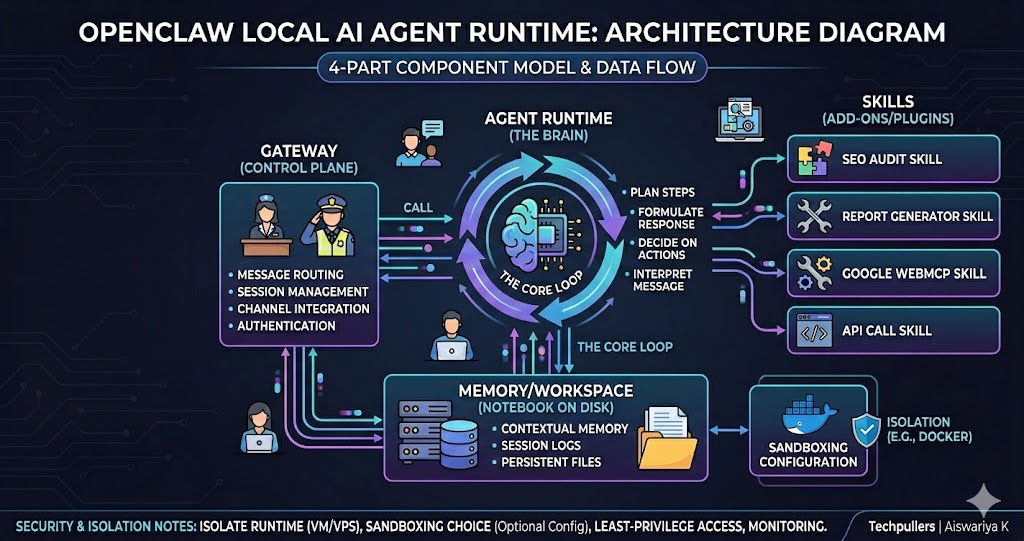
OpenClaw calls the Gateway the “control plane.” It handles routing, sessions, channels, and coordination. Think of it like the receptionist + traffic police. It makes sure WhatsApp messages don’t mix with Slack threads and that conversations stay organized.
This is the part that decides what to do next: interpret your message, plan steps, call tools, and return a result.
Layman example: “summarize all leads today and draft replies.”
Skills are how the assistant becomes useful beyond chat. The more skills you add, the more “actions” it can perform — but this is also where risk creeps in, because skills are essentially code you’re allowing into the runtime.
OpenClaw uses an agent workspace to store context and files needed for tasks. But workspace is not automatically a hard sandbox. Sandboxing is a configuration choice.
No. That’s not how security works.
Even if you use a workspace/sandbox, a self-hosted agent runtime can still:
If you want to stay ahead of these shifts from a web/SEO perspective, start here: SEO Audit Service and Technical SEO Services.
OpenClaw has a Heartbeat feature — basically a periodic tick that lets the agent run a small check loop on a schedule.
Layman example:
OpenClaw also has a Doctor tool for diagnosing and repairing common issues — configuration, health checks, and recovery steps. It’s not “magic AI fixing everything,” but it’s real operational tooling.
A few practical, boring-but-valuable use cases:
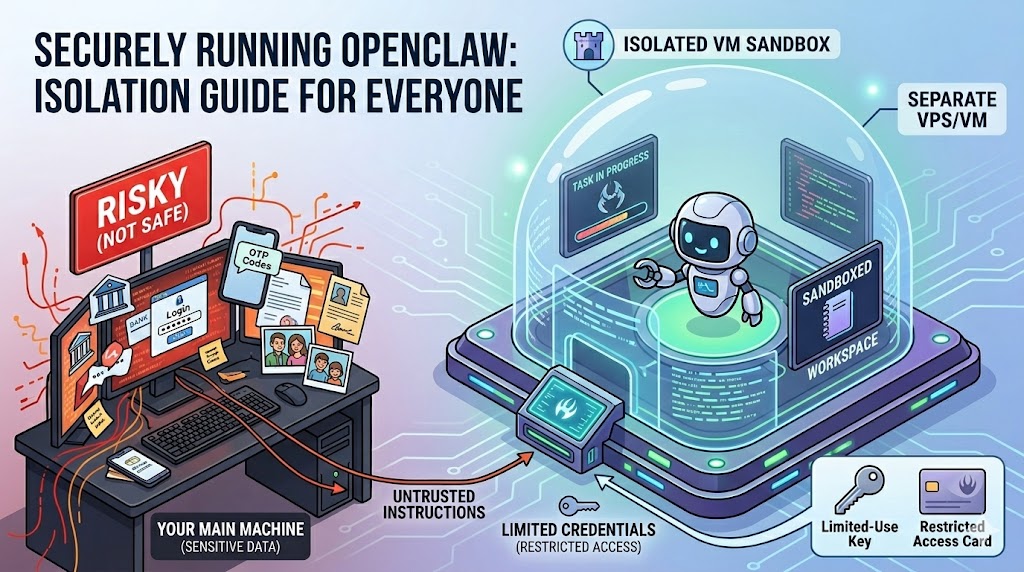
If you’re experimenting, don’t run OpenClaw on the same machine where your sensitive life is sitting. Use isolation (VM/VPS), separate credentials, and tight permissions.
Treat it like a system, and it can be powerful. Treat it like a toy, and it can become a problem.

Writen by
Posted On
March 04, 2026
Aiswariya Kolora is a professional digital marketing strategist and SEO expert. As the founder of Techpullers, she crafts effective online marketing strategies that help businesses grow.
Leave a Comment
Your email address will not be published. Required fields are marked *