Most people don't know this: That little red pin you randomly place on Google Maps is not just a temporary location marker, it is a powerful navigation tool that can significantly impact your business operations, your content strategy, or even your daily productivity.
If you are a content creator planning meetings, a small business owner handling deliveries and improving your local SEO, or just someone creating location-based workflows, understanding how Google Maps' pins work can be very helpful; in fact, it can save you time and prevent unnecessary expenses.
Everything you need to know about Google Maps pin locations in 2026 will be covered in this guide. Think of this as your trusted mentor revealing a gadget that appears straightforward but has many hidden features. We'll cover what works, what doesn't, and how to use pins strategically—whether you're just getting started or ready to level up your location game.
For more advanced digital strategy and SEO integration, you can explore professional insights at Techpullers.
Nowadays, search results are dominated by AI-driven experiences. AI-generated summaries, AI responses, and Google's AI Overviews frequently show up before natural listings. In order to provide succinct responses, AI search engines and AI assistants occasionally extract data straight from indexed content without requiring a website visit.
This has changed how users access and use information, as well as how search engines present it.
Practical implications of this change:
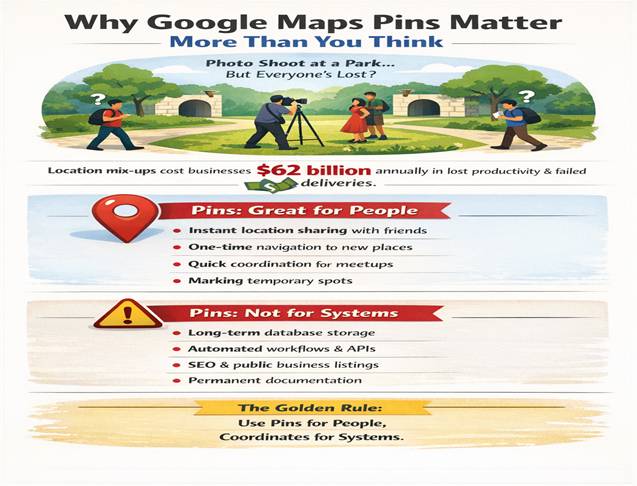
I'll give you a typical example: You're planning a park picture shoot. You drop a pin and share it with everyone in your team. They all show up, but at different entrances. Does that sound familiar?
This occurs because a lot of creators disregard the restrictions of pins and treat them as "acceptable" position identifiers. According to recent industry reports, location-based miscommunication costs businesses an estimated $62 billion annually in lost productivity and failed deliveries. The fact is that while pins are an excellent way to communicate quickly with others, they sometimes fail to meet your needs for accuracy, durability, or system integration.
Pins are excellent for:
Where pins cause difficulties:
The golden guideline is to use coordinates for systems and pins for people.
Before we go any further, let's resolve a serious misunderstanding. In Google Maps, you are dealing with more than simply "pins." In reality, location markers come in four different varieties, and most issues arise from mixing them up.
| Type | What It Does | Visibility | SEO Value |
|---|---|---|---|
| Dropped Pin | A temporary marker that you place manually | Only via shared link | None |
| Saved Place | The location is saved to your Google account | Private or shared via lists | None |
| Added Place | New public place you submit to Google | Public (if approved) | Indirect |
| Business Profile | Verified Google Business Profile listing | Public | Yes |
Critical Insight: Adding a pin does not establish a Google Business Profile, public location, or listing. If you're serious about local visibility, read our guide on Local SEO services for Kerala businesses.
Although the mechanics appear straightforward, some subtleties distinguish power users from casual users. Let's dissect each platform's best practices.
Here's where things get interesting. Every time you drop a pin, Google creates a "Plus Code" automatically. This is arguably Google Maps' most overlooked feature.
Think of them as a global address system that is compatible with all locations on the planet. Coordinates are used to generate these short, open-source location codes. For example: W6JJ+2X Kottayam.
Plus Codes solve a massive problem for creators working globally or in rural areas: they work without street names, house numbers, or postal codes. A 2025 World Bank study estimates that around 4 billion people reside in places lacking dependable addressing systems. These locations can be easily located thanks to Plus Codes.
I've seen this trip up countless creators and small teams. I'll now clarify the differences because there are serious issues when things are mixed.
"Can I drop pins without internet?" is one question I get asked all the time. Yes, you can but with some important conditions.
A large number of field teams from the construction, surveying, and content production industries still prefer this way of doing things: dropping a pin offline (without an internet connection), then taking a screenshot of both the map view and the coordinate display, and once you get back to the network, manually input those coordinates to create a new shareable link.
Although it isn't elegant, it is a dependable method that works when working remotely.
Not every sharing technique has been created equal. Here's what really works, according to user behaviour studies conducted in 2025.
Top sharing strategies (ordered by dependability):
Let this be one of the main points you remember from this guide: Coordinates should always be extracted and stored.
The only genuinely reliable, universal position data are coordinates (latitude and longitude). They are API-friendly, never expire, and allow for advanced tools like heatmaps, route optimisation, and GIS analysis.
How coordinates are extracted:
Store these in your project management tools, CRM, scheduling software, or spreadsheets. These will be useful in the future if you need to conduct location analytics, create custom maps, or interact with routing engines.
Let's clear up the most common error: adding a Google Maps pin to your company's location will NOT boost local search engine optimisation.
Pins have no SEO value, don't function as citations, and don't generate Google Business Profiles. They are not marketing materials; they are navigational aids.
What genuinely aids in local SEO:
Pins in Google Maps are deceptively easy-to-use tools. They appear basic, but if you are familiar with their advantages and disadvantages, they can become valuable instruments in your creator toolkit.
Keep in mind these basic ideas:
Google Maps pins become a tactical advantage when you use them as lightweight navigation tools and, where necessary, combine them with appropriate structured data.
Mastering pins will save you a great deal of time and avoid confusion in the real world, whether you're handling deliveries for your e-commerce company, organising a video shoot across several sites, or simply attempting to direct your podcast visitors to the studio entrance.
Now you too can confidently go ahead and pin. If you want Google's official steps, see Google Maps Help: Drop a pin & share a place.
Additionally, don't forget to leave a comment if you have a unique use case or a tricky location. Real-world problem-solving yields the best insights, and your experience could save another creator from making an expensive error.

Writen by
Posted On
February 05, 2026
Aiswariya Kolora is a professional digital marketing strategist and SEO expert. As the founder of Techpullers, she crafts effective online marketing strategies that help businesses grow.
Leave a Comment
Your email address will not be published. Required fields are marked *